
You're probably dealing with some version of the same day most commercial grounds operations teams face. A property manager calls before 8 a.m. with a missed detail at one site. One crew is running behind because traffic broke the route plan. Another crew finishes early but can't be redirected cleanly because the office doesn't have current field visibility. By late afternoon, job notes are incomplete, photos are missing, and invoicing gets pushed because nobody is fully confident about what was completed where.
That isn't a calendar problem. It's an operating system problem.
For commercial, multi-property outdoor service companies, scheduling sits in the middle of labor utilization, route density, service consistency, and client trust. If the schedule lives in spreadsheets, texts, and memory, the business pays for it through wasted windshield time, preventable overtime, uneven service quality, and slower billing. The broader market is big enough to make that inefficiency expensive at scale. The outdoor service market was estimated at USD 129.7 billion in 2025 and is projected to reach USD 201.9 billion by 2034 at a 5.04% CAGR, while the most-used digital tools in the industry are tied to accounting (77%), invoicing (72%), and estimates (61%), which is a strong signal that scheduling software creates the most value when it connects to financial and job-costing workflows rather than operating as a standalone calendar tool, according to FieldPie's landscaping software market overview.
If your operation also manages mobile sales coverage or field reps alongside service crews, it helps to look at adjacent workforce tools too. This overview of OnRoute for sales operations is useful because it shows how route visibility, mobile dispatch, and field coordination matter beyond landscaping alone.
A practical benchmark is whether your team can see work status in one place, not five. This is the same logic behind a centralized job dashboard for commercial landscape operations. Once dispatch, field updates, and service proof are connected, scheduling starts behaving like a management tool instead of a daily scramble.
Table of Contents
- Why Your Spreadsheet Is Costing You More Than You Think
- Defining Your Operational Needs Before You Shop
- Core Features That Drive Commercial Landscaping Success
- Evaluating and Piloting Your Top Software Candidates
- From Pilot to Full Rollout A Strategic Onboarding Plan
- Measuring Success Beyond The Schedule
Why Your Spreadsheet Is Costing You More Than You Think

Spreadsheets work longer than they should. That's why so many commercial contractors stay with them. They seem flexible, everyone understands them, and they don't force process changes on day one.
Then the portfolio grows.
A spreadsheet can list jobs, but it can't manage the actual complexity of commercial service delivery across office parks, retail centers, HOAs, healthcare campuses, and industrial sites with different access windows, irrigation issues, enhancement requests, and service expectations. Once multiple crews, branch locations, and recurring contracts enter the mix, the hidden cost stops being administrative inconvenience and starts hitting gross margin.
Where the loss actually shows up
The first leak is labor allocation. A scheduler might fill every crew's day and still build an inefficient operation because jobs are assigned without enough regard for route shape, skill mix, equipment dependencies, or how long service proof takes at each stop.
The second leak is service inconsistency. One crew lead knows a site inside out. Another crew gets sent there on a rushed reroute and misses a bed detail, skips a note, or forgets a client-specific requirement. The office only finds out when the property manager sends photos.
The third leak is billing delay. If completion notes, production tracking, and service verification are disconnected from the daily schedule, invoicing slows down because admin teams have to chase confirmation after the work is supposedly done.
Practical rule: If the office has to text crews for status updates more than it checks a live system, the scheduling process is already too manual for commercial scale.
Generic calendars break at commercial scale
A basic dispatch board might look organized, but most generic tools don't answer the questions commercial buyers care about:
- Can we group recurring work by geography? That's route density.
- Can we compare labor performance by property type? That's operational visibility.
- Can we standardize service delivery across branches? That's portfolio consistency.
- Can completed work trigger billing without manual cleanup? That's cash flow discipline.
Here's the trade-off many teams miss:
| Approach | What it handles well | Where it fails |
|---|---|---|
| Spreadsheet plus calls and texts | Small team coordination, short-term flexibility | Route planning, field visibility, service proof, branch standardization |
| Standalone calendar app | Simple dispatching | Job costing, CRM connection, recurring contract logic |
| Integrated landscape scheduling software | Multi-crew assignment, mobile updates, invoicing links, reporting | Requires stronger setup and cleaner process discipline |
Software doesn't fix weak operations by itself. But weak operations get exposed much faster when volume rises. In commercial landscaping, that's useful. It forces the company to schedule based on actual constraints instead of habit.
Defining Your Operational Needs Before You Shop
Most software searches start too late and too vaguely. Someone is frustrated, a demo gets booked, and the team starts comparing feature lists before they've defined the operating problems clearly enough to solve them.
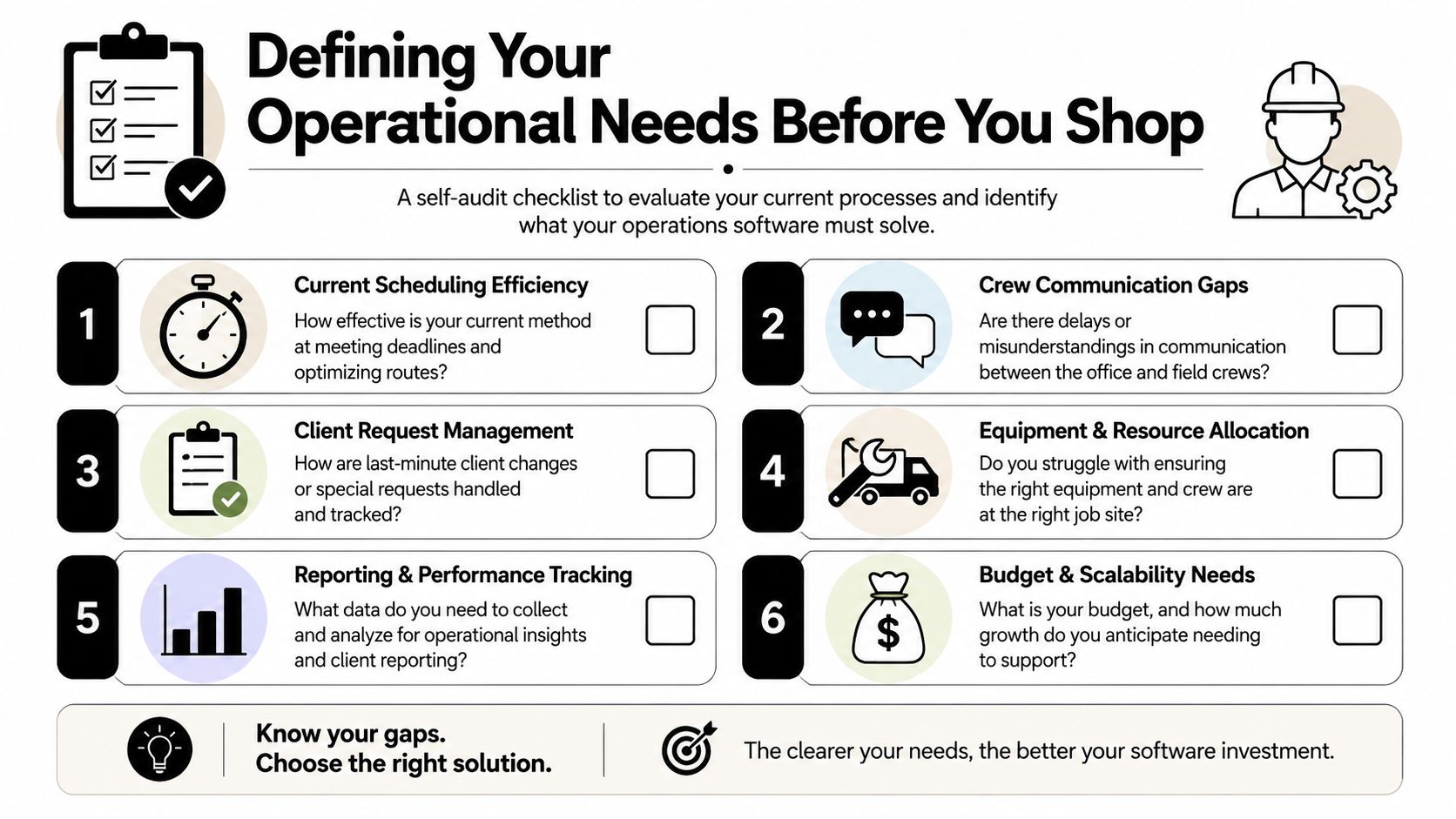
That's backward. You shouldn't shop for scheduling software until you've completed an internal audit of how work moves from contract to route to job completion to invoice.
Start with the friction, not the feature list
A good self-audit starts with the points where your team loses control of the day. Vendor-reported results show businesses can achieve 32% faster job scheduling and 33% quicker estimated-versus-actual calculations after implementation, and the operational indicators worth tracking include job completion timelines, scheduling efficiency, and invoice turnaround time, as noted by Aspire's landscape business software guidance.
Those numbers are useful only if you know your own baseline. Before you evaluate any platform, document the following:
- Recurring contract complexity: How many maintenance programs, enhancement visits, irrigation calls, and seasonal rotations are being scheduled at once?
- Travel inefficiency: Where are crews wasting time between sites because the route is convenient on paper but poor in the field?
- Completion-to-billing lag: How long does it take for a finished service to become invoice-ready?
- Service drift: Which properties depend too heavily on one experienced crew leader to maintain standards?
- Exception handling: How do you currently manage same-day requests, weather changes, irrigation emergencies, or client holds?
A lot of commercial property managers ask similar questions when they evaluate service partners in the first place. This guide on what property managers should look for in a commercial landscaping partner is a good reminder that consistency, responsiveness, and visibility matter just as much as horticultural quality.
Build your software requirements around operations
I'd separate requirements into three buckets. Not every bucket carries equal weight.
Non-negotiables
- Multi-property account structure
- Recurring service scheduling
- Mobile crew updates
- Photo and note capture tied to jobs
- Dispatch visibility by crew and route
- Invoice readiness tied to completed work
Operational priorities
- Route optimization by geography
- Crew assignment by skill and asset availability
- Property-specific instructions
- Service-window controls
- Reporting by branch, property type, and service line
Nice-to-have items
- Client-facing portals
- Advanced customization
- Highly detailed dashboards that your team may never use
Don't let a polished demo replace a written requirements document. If your team can't describe the exact scheduling problems it wants to solve, a vendor will fill the gap with generic promises.
Questions worth answering before the first demo
Use a short working brief. It doesn't need to be fancy. It does need to be specific.
- Which jobs are recurring, and which only look recurring?
- Which sites require special equipment, timing, or compliance notes?
- Which crews can flex across irrigation, enhancement, and maintenance work?
- Where does information live today when a property manager calls with a change?
- What report would leadership want each week that the current process can't produce reliably?
That brief becomes your internal RFP, even if you never issue a formal one. It stops you from buying software that looks modern but still leaves your hardest scheduling problems untouched.
Core Features That Drive Commercial Landscaping Success
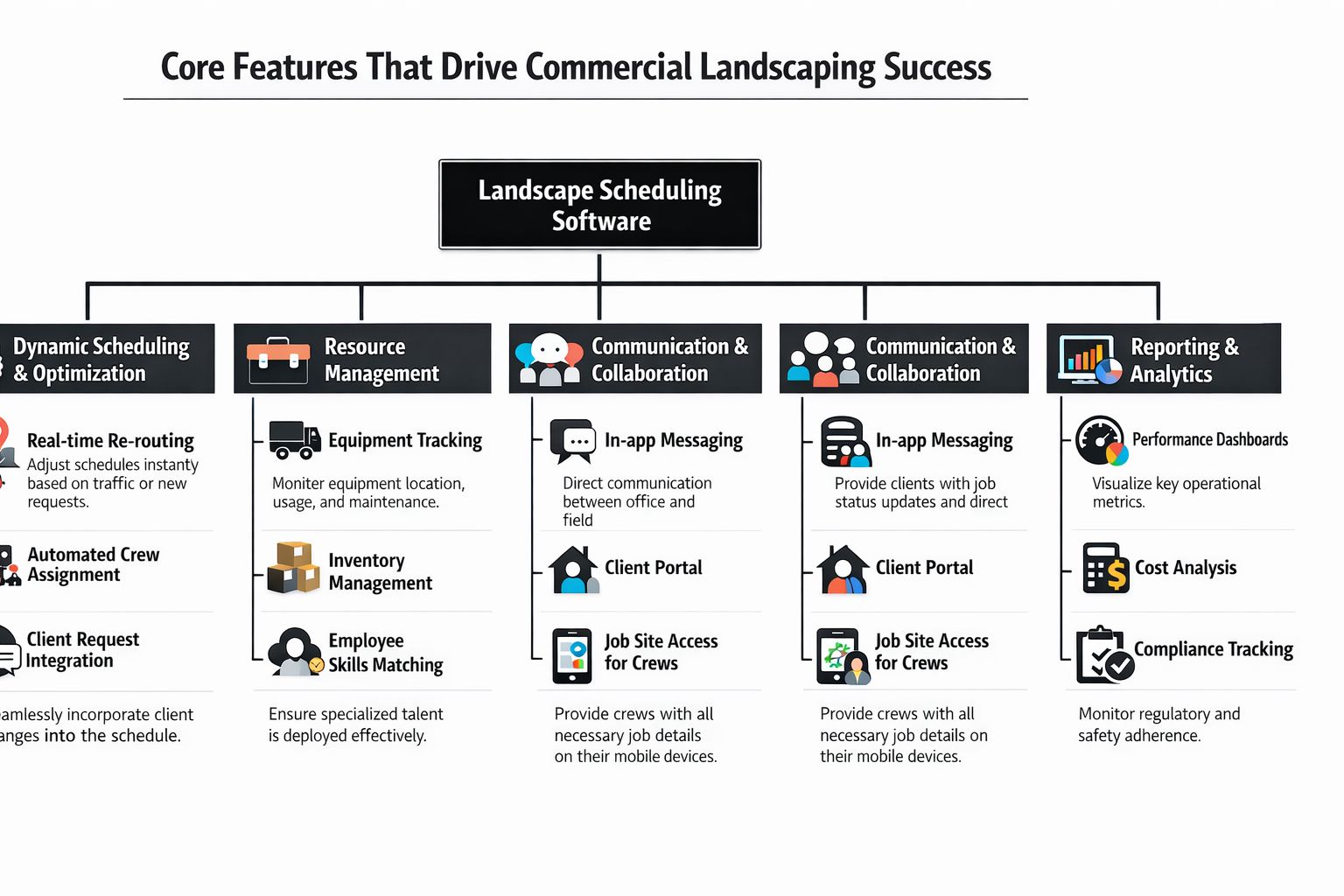
On a Monday morning, the schedule can look full and still be wrong. One crew is crossing the city between small stops, another is missing a gate code at a Class A office park, and an irrigation tech is tied up on routine maintenance while a high-value property waits on a repair. Good software fixes those operating failures, not just the calendar view.
For commercial grounds companies, the system has to hold route logic, property standards, crew capacity, field updates, billing status, and service history in one place. If those pieces sit in separate tools, the office spends its day stitching together answers and crews feel the gaps first.
Industry coverage of connected management systems makes the same point. Firms get better control when scheduling, dispatch, field execution, and back-office workflows run inside one system instead of across disconnected apps, as noted in Acumatica's management software analysis.
Scheduling has to reflect contract reality
At the commercial level, a work order is never just a date and a crew. It includes frequency, approved service window, access restrictions, site-specific instructions, enhancement history, and exceptions that affect the next visit. If the platform cannot store that context at the property level, dispatchers rebuild it from memory, emails, and text threads.
The strongest systems handle a few things well:
- Recurring service rules tied to actual contract commitments
- Crew assignment logic based on skill set, labor mix, and available equipment
- Property-level instructions that stay attached to every visit
- Exception workflows for weather delays, client changes, irrigation issues, and missed stops
That structure supports consistency across large portfolios. A property manager with ten sites wants the same standard followed at every location, even when different crews rotate through the account.
Scheduling works better when the software stores the property playbook and applies it every time the job is dispatched.
Route density should shape the schedule
A packed day is not the same as a profitable day.
In multi-property operations, margin improves when stops are clustered well, windshield time stays under control, and crew hours are spent on contracted work instead of travel. Software should help dispatchers build dense routes by geography, rebalance overloaded days, and see the labor cost of squeezing one more stop into the wrong part of town.
Generic field calendars often prove inadequate. They can place jobs on a date, but they do very little to protect route quality across an entire branch. For commercial property maintenance, that gap shows up quickly in overtime, callbacks, and missed service windows.
Operators comparing adjacent tools may also want broader context on connected scheduling and routing. Unlock growth with powerful lawn care software is useful background on how connected scheduling, routing, and business workflows support expansion.
Mobile execution is how standards hold up in the field
Office planning only matters if crews can execute against it without confusion. Crew leaders need the day's work, site notes, photos, task instructions, and completion steps on a phone or tablet they will use. If they still have to call the office for every detail, the schedule is carrying less value than it should.
For commercial accounts, mobile tools also protect service quality. They create a record of what was done, what was skipped, what changed on site, and what needs follow-up. That record matters when an asset manager asks why one property looks off compared with the rest of the portfolio.
Water management is a good example. Irrigation work often changes route plans, labor allocation, and return visits within the same week, so the scheduling system needs to support that pace. Teams handling those jobs should align software workflows with broader commercial irrigation and water management practices in Texas landscapes.
Reporting should help operations leaders make decisions
Plenty of platforms show charts. Fewer answer the questions a branch manager, account manager, or regional operator asks on Friday afternoon.
Useful reporting should make it easier to spot wasted drive time, uneven crew performance, recurring service failures, and properties that absorb too much non-billable labor. It should also let leadership compare branches and service lines using the same definitions, which is how larger companies standardize performance across multiple offices.
| Management question | Useful reporting output |
|---|---|
| Which properties consume too much non-billable travel time? | Route and travel comparison by property cluster |
| Which crews are strongest on certain site types? | Productivity by crew and property type |
| Where is service quality inconsistent? | Completion notes, photos, callbacks, and exceptions by site |
| Which contract types are hardest to schedule well? | Schedule adherence and labor variance by service line |
If the platform cannot produce those answers cleanly, it may still help the dispatcher fill a board. It will not give operations leadership much control over labor utilization, route density, or cross-site consistency.
Evaluating and Piloting Your Top Software Candidates
Once your needs are documented, narrow the field aggressively. Commercial operators don't need ten demos. They need a shortlist of systems that can handle recurring work, route logic, mobile field execution, and reporting without forcing the office back into spreadsheets.
I'd cut to three candidates at most.
What to ask in a live demo
Don't let vendors drive the script with a polished overview. Give them scenarios from your own operation and make them work through them live.
Ask for demonstrations like these:
- A same-day irrigation repair inserted into an already full route for a high-priority commercial client
- A missed visit recovery where the office needs to reassign work without losing property instructions
- A crew change at midday because equipment availability or labor mix changed
- A multi-property account view showing site-specific notes, service history, and what's due next
- A billing handoff from completed work to invoice-ready status
What you're looking for isn't just whether the software can do it. Watch how many clicks it takes, whether the logic is clear, and whether the workflow makes sense for dispatchers under pressure.
A strong commercial platform should handle operational exceptions in a structured way. A weaker one usually looks good until the first real-world disruption.
If a vendor can't show your ugliest scheduling scenario in the demo, you haven't actually seen the product.
How to build a pilot that exposes weaknesses
A pilot should create stress, not comfort. If you test software only on simple jobs and cooperative users, you'll learn almost nothing.
Use a controlled pilot with:
- A small but capable group: Choose crew leaders and office users who are practical, candid, and willing to follow process.
- A mix of properties: Include recurring maintenance, at least one site with access complexity, and one property that generates frequent client communication.
- Parallel validation: Keep your old process running just enough to compare outcomes and catch errors.
- A clear evaluation sheet: Track where the platform helped, where it slowed users down, and where work still escaped the system.
I'd also define pass-fail criteria in advance. Not technical criteria alone. Operational ones.
For example:
- Can dispatchers make same-day schedule adjustments without confusion?
- Can crews complete jobs with consistent mobile documentation?
- Can supervisors review status without chasing texts and calls?
- Can admin move work toward billing with less rework?
- Can managers see enough data to evaluate route efficiency and service consistency?
You don't need a long pilot. You do need an honest one. The goal isn't to prove that software works in theory. The goal is to see whether it holds up under the messiness of commercial field operations.
From Pilot to Full Rollout A Strategic Onboarding Plan
Implementation is where good buying decisions go bad. Most failures don't happen because the platform lacks features. They happen because the company rolls it out too broadly, too quickly, with weak data and vague ownership.
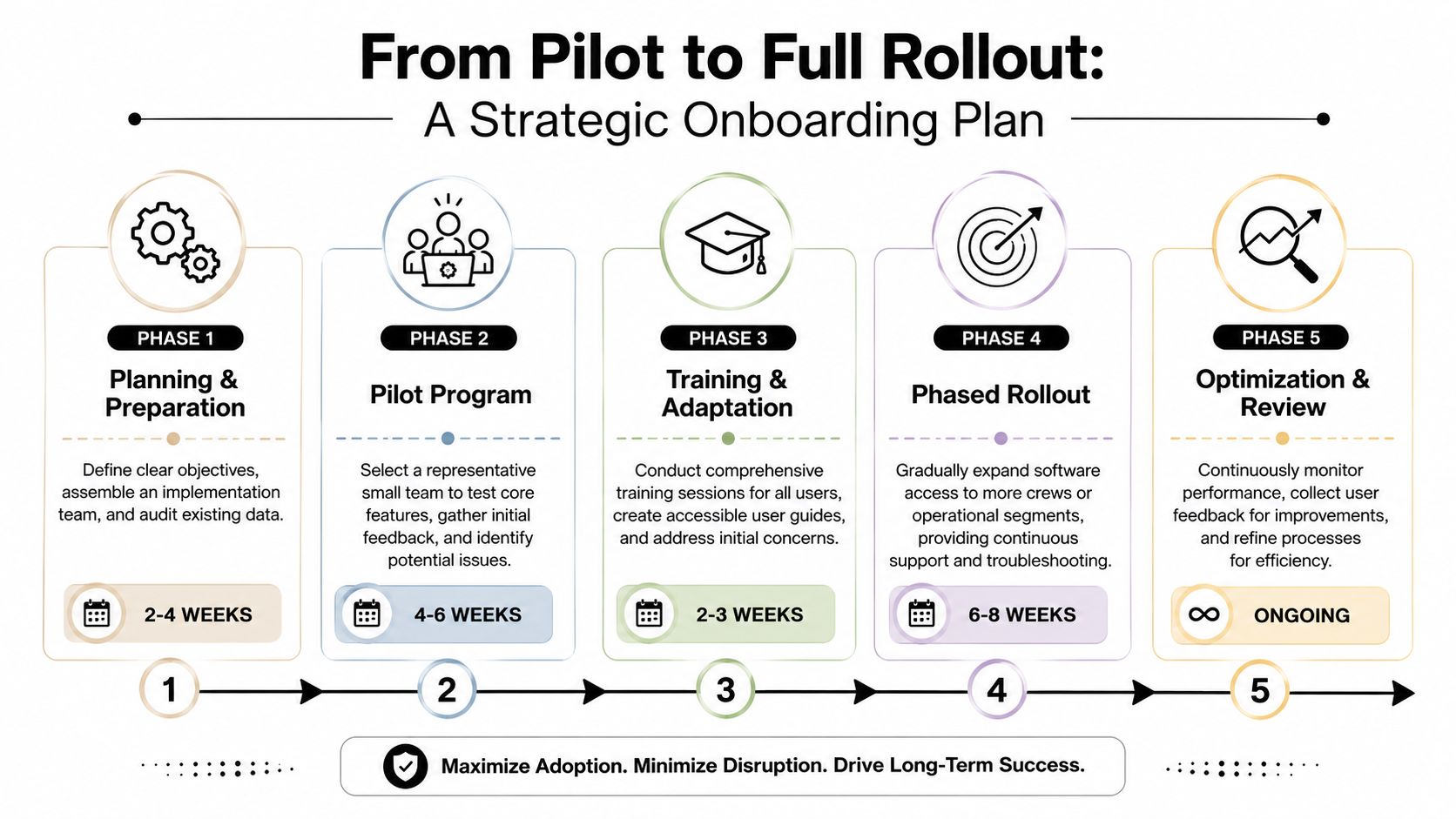
A practical rollout method starts with mapping service work, defining crew and route constraints, automating assignment rules, and then tracking progress in real time through mobile dashboards. That workflow is directly tied to reducing manual errors and improving labor allocation, as described in Praxedo's rollout guidance for landscape scheduling software.
Get the data clean before you train anyone
Bad data poisons adoption fast. If crews open the mobile app and see wrong property notes, missing service instructions, or outdated client contacts, they stop trusting the system.
Before broad rollout, audit and clean:
- Customer and property records
- Recurring service templates
- Access instructions and gate details
- Crew structures and equipment dependencies
- Contract-specific notes and special service windows
Then appoint one internal owner. Call that person the software champion, implementation lead, or operations coordinator. The title doesn't matter. Accountability does.
That person should own issue tracking, process decisions, and feedback collection during rollout. Without a clear internal owner, every problem gets treated like a vendor problem, even when it's really a process problem.
Roll out by branch or service type
Company-wide launches sound decisive. They usually create noise.
A phased rollout works better because it gives the team room to fix real issues before they multiply. In a commercial outdoor services company, the cleanest sequence is often one branch, one service category, or one portfolio segment at a time.
For example, you might start with:
| Rollout option | Best use case | Main advantage |
|---|---|---|
| One branch first | Multi-location company | Easier support and tighter feedback loop |
| Maintenance only | Heavy recurring contract base | Faster standardization of routine work |
| Selected portfolio group | High-value or operationally complex properties | Better stress-testing of service quality controls |
Training should also be role-based.
- Crew members need job access, notes, photos, status updates, and exception reporting.
- Crew leaders need route awareness, work verification, and communication discipline.
- Dispatchers need schedule changes, reassignment logic, and route oversight.
- Admins need completion review and invoice readiness.
- Managers need dashboards, exception visibility, and reporting.
Don't overload field training with office functions they'll never use. And don't assume office users understand field friction unless they've seen the mobile workflow firsthand.
The first version of your rollout process won't be perfect. That's normal. What matters is whether the company corrects quickly without abandoning the system at the first sign of resistance.
Measuring Success Beyond The Schedule
A neat dispatch board is not the finish line. Commercial buyers need proof that grounds maintenance scheduling software improves labor utilization, route density, and service standardization across multiple properties. Industry commentary keeps pointing out the same gap. Too much software content treats scheduling like a generic crew calendar, while real commercial success depends on productivity data by property type and stronger cross-site consistency, as noted in Dynascape's discussion of landscaping scheduling software for commercial operations.
That's the right standard.
After rollout, measure performance against the operational pain points you defined before shopping. Focus on whether the software helps your team:
- Reduce non-billable travel time by building tighter route clusters
- Improve crew productivity across different property categories
- Shorten invoice turnaround after service completion
- Standardize service delivery across branches, account managers, and crew leaders
- Spot service drift early before the client has to report it
One of the biggest mistakes I see is celebrating software adoption instead of operational improvement. High login activity doesn't mean much if routes are still sloppy and field documentation is still incomplete.
A better question is simple: are property managers getting more consistent service with fewer surprises?
If the answer is yes, the software is doing its job. If the answer is no, you don't have a technology issue alone. You have a process issue that the software has finally made visible.
If your team needs a commercial landscaping partner that already understands route discipline, property-level service standards, irrigation visibility, and consistent communication across complex portfolios, Prestonwood Commercial Landscape Services is built for that kind of work. They support office, retail, industrial, hospitality, healthcare, HOA, and campus properties with full-service maintenance, irrigation, enhancements, and construction, backed by the operational systems needed to keep service quality consistent across every site.